
Making Your Next Login Even More Secure
We’ve added extra security measures in Online and Mobile Banking. It’s called two-factor authentication, and it’s an easy update you’ll quickly appreciate.
What to Expect When You Login
You will be prompted to “Set Up Your App”

If you select “Secure My Account”, you will then have a choice of 2-Factor Authentication options
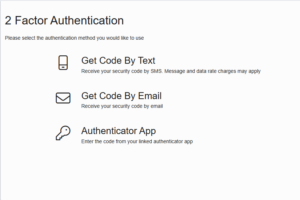
You can choose to receive a Two-Factor Authentication Code by
- Text
- Authenticator App (TOTP)
- An Authenticator App (TOTP) generates constantly changing, short-lived codes on your device to provide a strong second layer of security for your online accounts, working with your password for two-factor authentication (2FA). Authenticator Apps are more secure than SMS codes because they work offline and aren’t vulnerable to SIM-swapping attacks, using a shared secret and the current time to create codes that expire every 30-60 seconds.
- Install the Authenticator on your mobile device before registering for TOTP. The following Authenticator Apps are available in the Google Play Store or the App Store
- An Authenticator App (TOTP) generates constantly changing, short-lived codes on your device to provide a strong second layer of security for your online accounts, working with your password for two-factor authentication (2FA). Authenticator Apps are more secure than SMS codes because they work offline and aren’t vulnerable to SIM-swapping attacks, using a shared secret and the current time to create codes that expire every 30-60 seconds.

Google Authenticator App



Microsoft Authenticator App
Have questions about two-factor authentication? Give us a call at 718-878-4624.
 Your savings are federally insured to at least $250,000, and backed by the full faith and credit of the United States Government.
 Equal Housing Lender - We do business in accordance with the Federal Fair Housing Law and the Equal Housing Opportunity Act.